
Project Overview
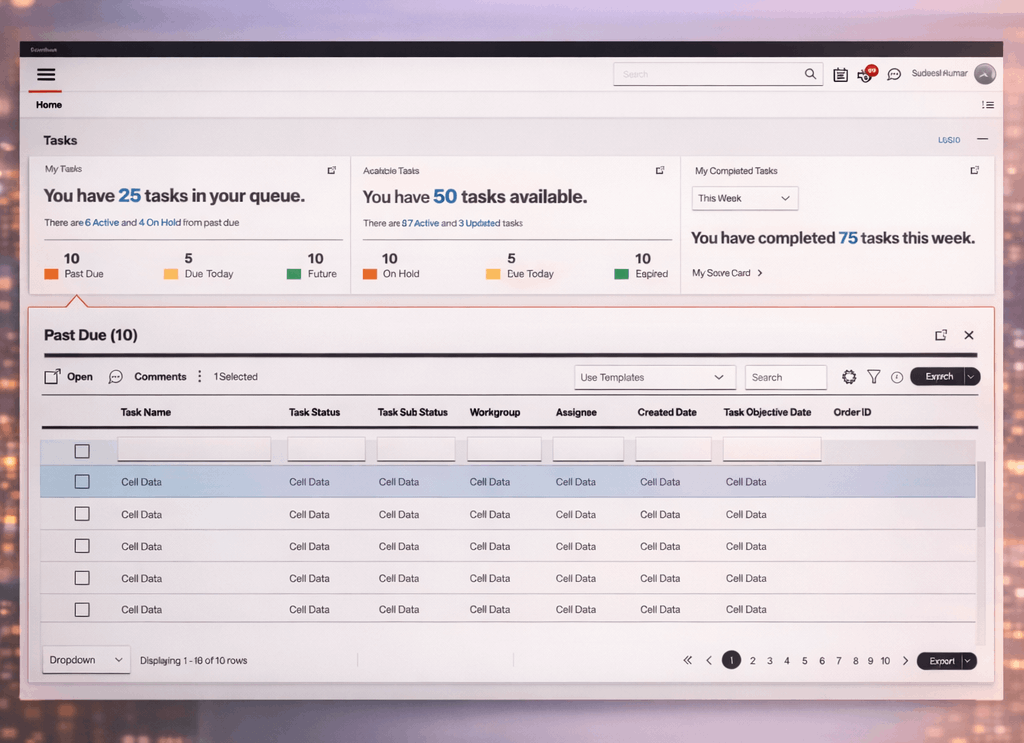
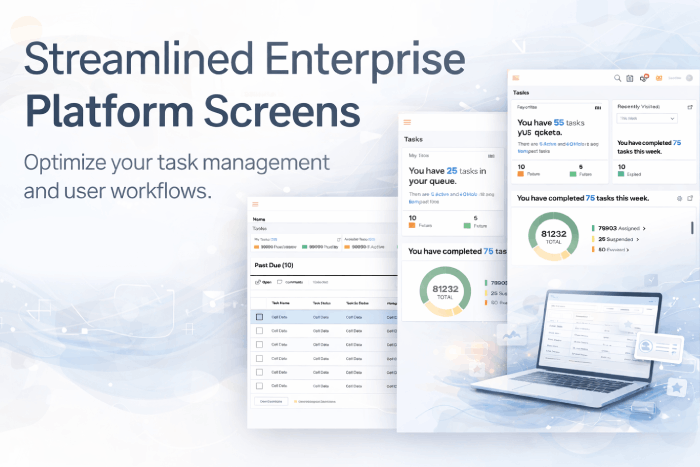
The Unified User Interface (UUI) was a large-scale enterprise UX transformation for a telecom organization operating on more than 50 years of legacy systems. Over decades, internal tools had been built in silos—each optimized for a specific function, system, or vendor—resulting in a fragmented experience that traded time and productivity for task completion.
The UUI initiative focused on upgrading this legacy ecosystem into a single, intelligent platform that prioritizes time-to-task over time-to-train, improves usability, and enables long-term digital scalability. Rather than asking users to navigate across multiple systems, UUI was designed to bring systems to the user—fundamentally changing how work is performed across the enterprise.
Context & Role
I was the primary conceptual owner and hands-on designer of the UUI platform. In addition to driving alignment and direction, I designed the core interaction model, dashboard architecture, workflows, and system patterns that defined how the platform operates in practice.
My role spanned end-to-end ownership, including:- Conceptualizing the UUI platform vision and experience model
- Designing interaction flows, dashboards, and widget-based UI patterns
- Leading brainstorming, whiteboarding, and problem-solving sessions
- Building and evolving the design system and component framework
- Iterating designs continuously based on real-world usage and feedback
This role blended deep hands-on execution with platform-level thinking, ensuring the solution was not only scalable, but also usable in day-to-day operations.
Problem
Enterprise users were losing significant time and productivity due to deeply fragmented systems that forced them to navigate interfaces instead of completing tasks.
Key challenges included:- Hundreds of siloed applications with inconsistent navigation, layouts, and interaction patterns
- Users required to jump from system to system to gather information or complete a single task
- Workflows optimized around system constraints rather than real-world user responsibilities
- High cognitive load caused by excessive clicks, context switching, and duplicate data entry
- Heavy reliance on training, documentation, and tribal knowledge
- No shared design language, reusable components, or unified experience model
The core issue was not outdated UI—it was the absence of unified experience thinking, where systems were designed independently rather than as part of a cohesive user workflow.
Strategy & Design Approach
I approached UUI as a platform-level design challenge, recognizing that isolated UI fixes would not address the systemic inefficiencies.
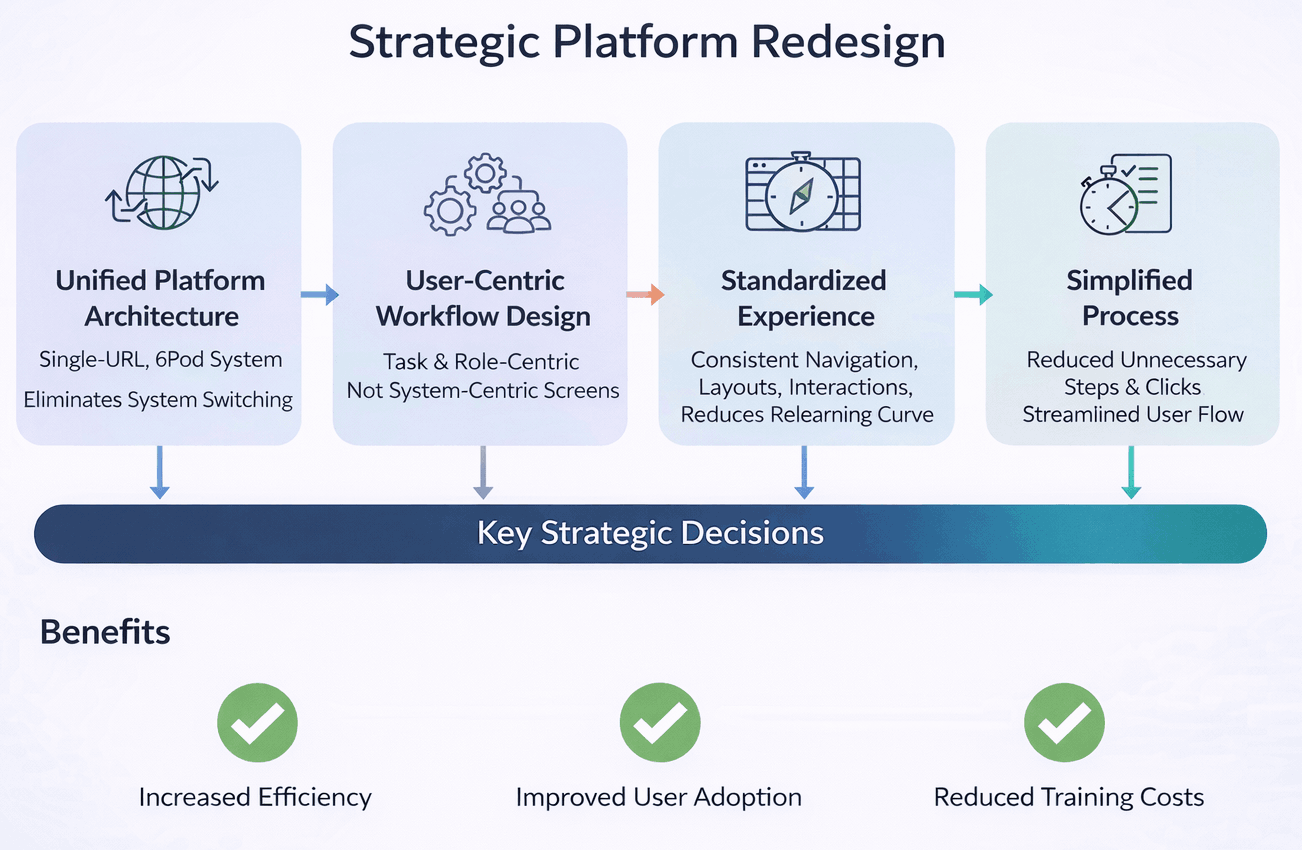
Key strategic decisions included:
- Designing a single-URL, SPA-based platform to eliminate unnecessary system switching
- Shifting experience design from system-centric screens to task- and role-centric workflows
- Standardizing navigation, layouts, and interaction behaviors to reduce relearning
- Reducing unnecessary steps, clicks, and repeated inputs across workflows
The strategy intentionally balanced consistency with flexibility—providing a strong foundation that allowed teams to build faster, while preserving a unified experience across the ecosystem.
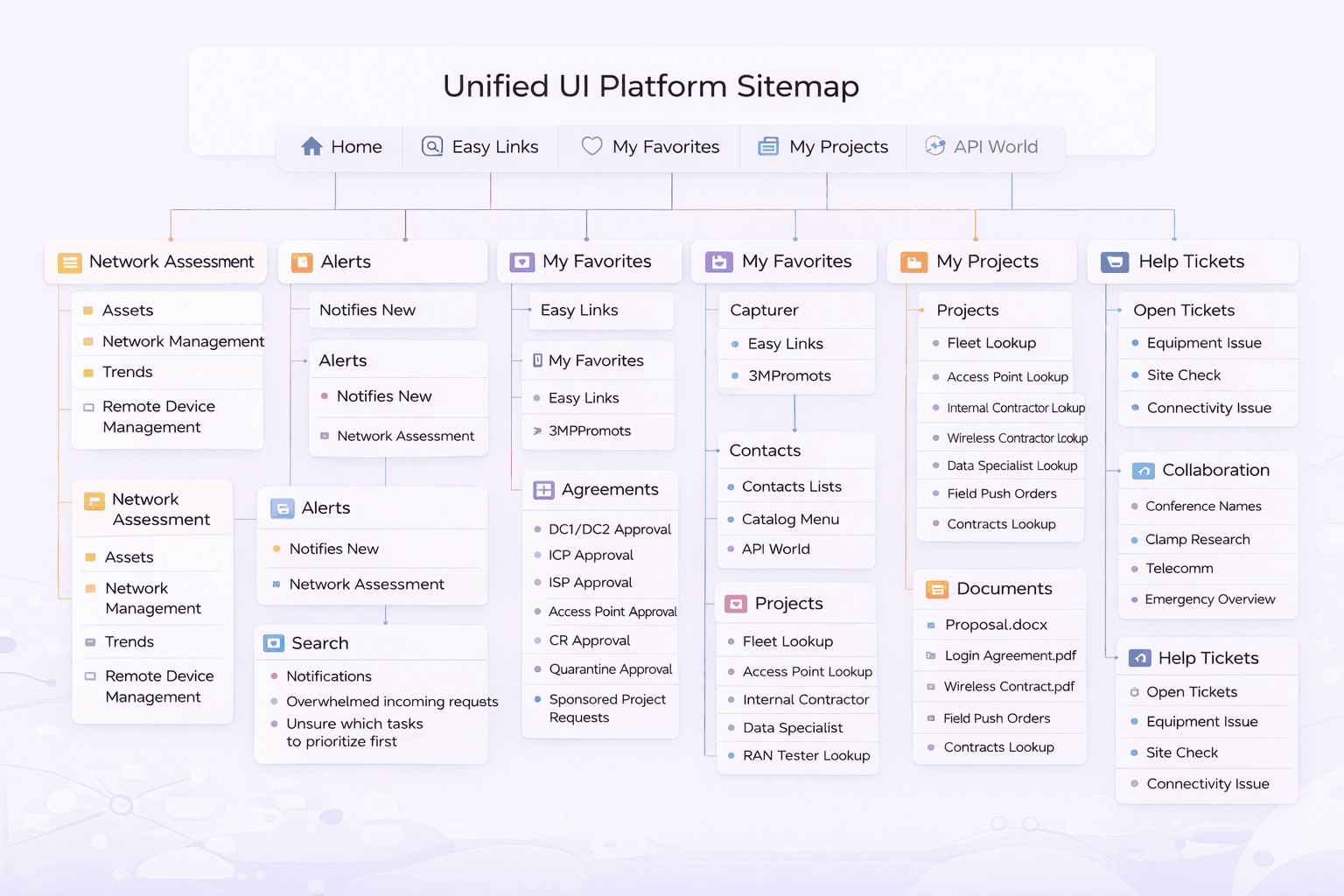
UUI Platform Concept (System-Level Design)
UUI was designed to optimize time-to-task rather than time-to-train. In legacy environments, productivity was lost because users spent more effort navigating systems than accomplishing work. UUI inverted this model.
Key Platform Concepts
-
Applications as Data Widgets
- Each application is represented as a modular data widget within a unified dashboard, rather than a full-screen destination. AI/ML-Driven Dashboard
- The dashboard dynamically populates data, widgets, and actions based on the user’s role, responsibilities, and behavior—surfacing what matters most, when it matters. Multi-Profile Experience
- Users can maintain multiple profiles (e.g., operational, managerial, analytical), each with its own dashboard configuration. This allows users to switch context without switching systems. Context Switching Without System Switching
- Profiles change the dashboard view, widget priority, and data depth—eliminating the need to log into different tools. Context Internal App Store
- An internal App Store allows users to add or remove applications (widgets) from their dashboard as responsibilities evolve, while maintaining enterprise governance.
Together, these capabilities transformed UUI into an intelligent, user-centric platform that adapts to how people work, rather than forcing people to adapt to systems..
MY ROLE
As VP of UX I held end-to-end accountability for the experience vision, governance model, and delivery outcomes within the Phenom ecosystem. My role extended beyond design leadership into organizational enablement and executive decision-making—directing how UX strategy was defined, operationalized, governed, and signed off across internal teams and external partners. I acted as the final authority on experience decisions, ensuring alignment between business objectives, regulatory requirements, platform constraints, and user needs.
Responsibilities
- Defined experience strategy and UX direction for the career site and candidate journeys
- Governed vendors to ensure alignment with UX standards, accessibility, and banking compliance
- Established UX intake and decision frameworks to reduce ambiguity and rework
- Enabled business, product, and technology teams with clear UX processes and ownership
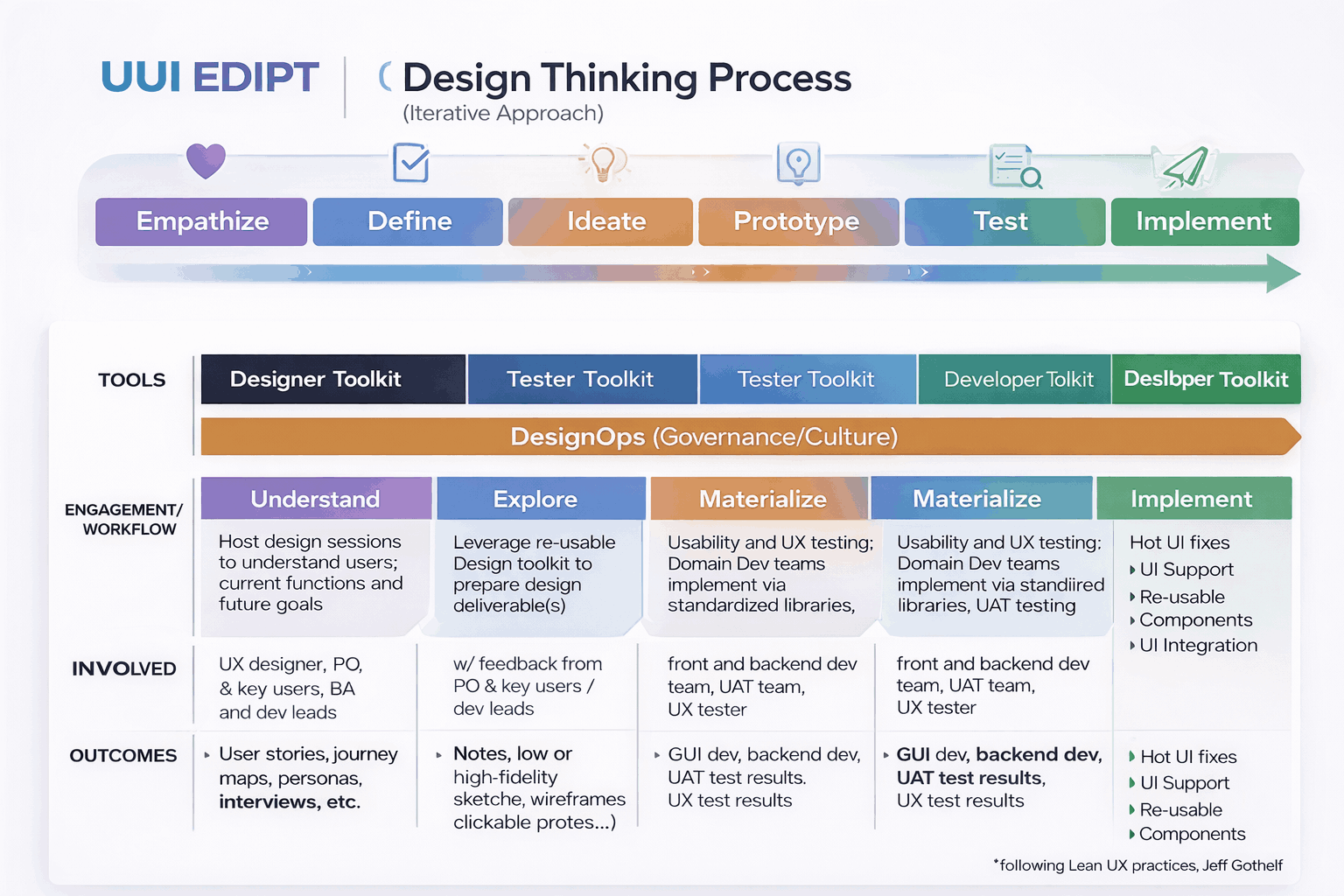
Research & Insights
Research was hands-on, continuous, and embedded directly into design work, rather than treated as a separate phase.
I conducted:- Contextual inquiries and task walkthroughs with real users
- Observation of live workflows to uncover inefficiencies and workarounds
- Rapid validation through low-fidelity prototypes and feedback loops
A key insight consistently emerged:
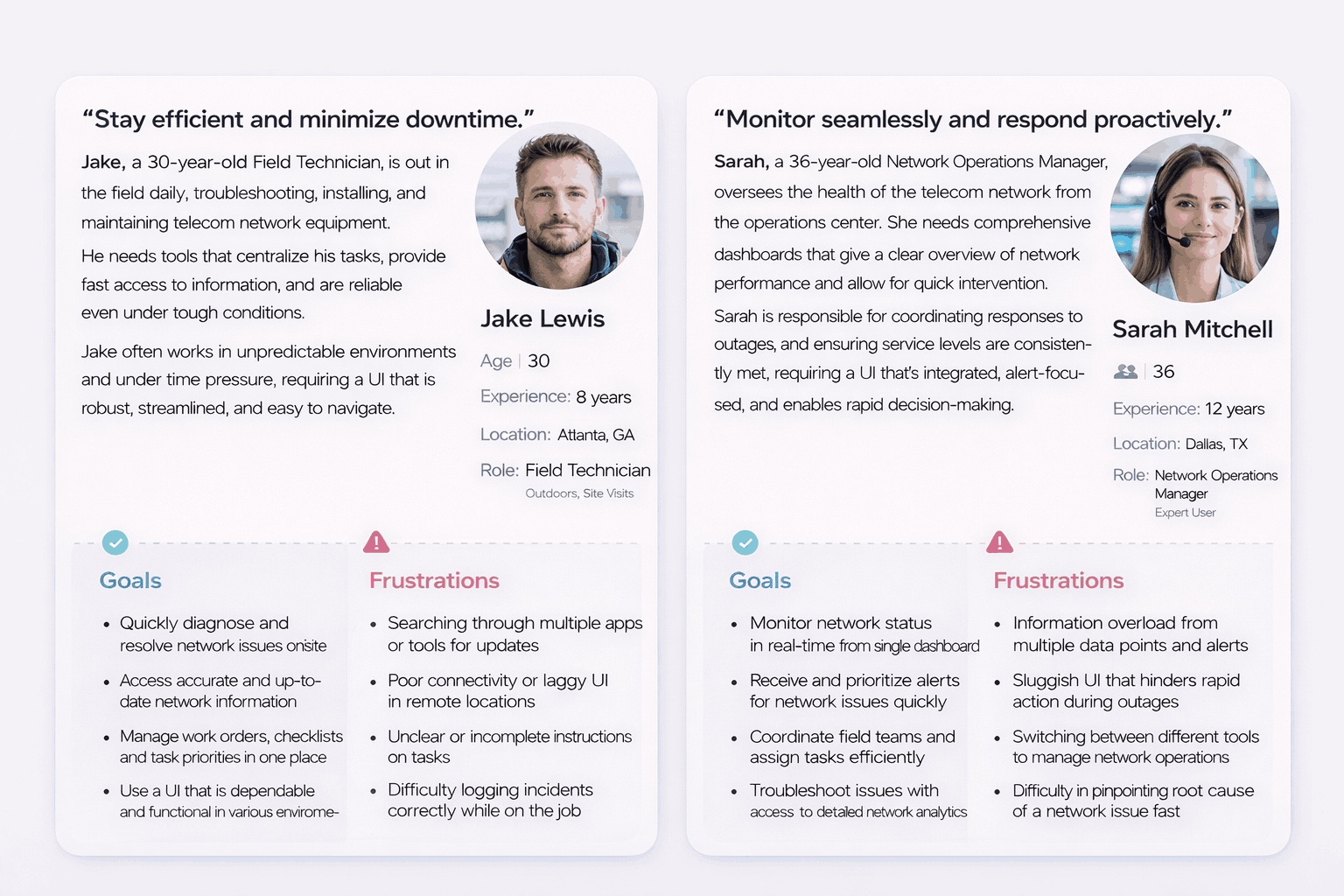
Personas & User Journeys
Personas were defined based on roles, responsibility, and task frequency, not demographics.
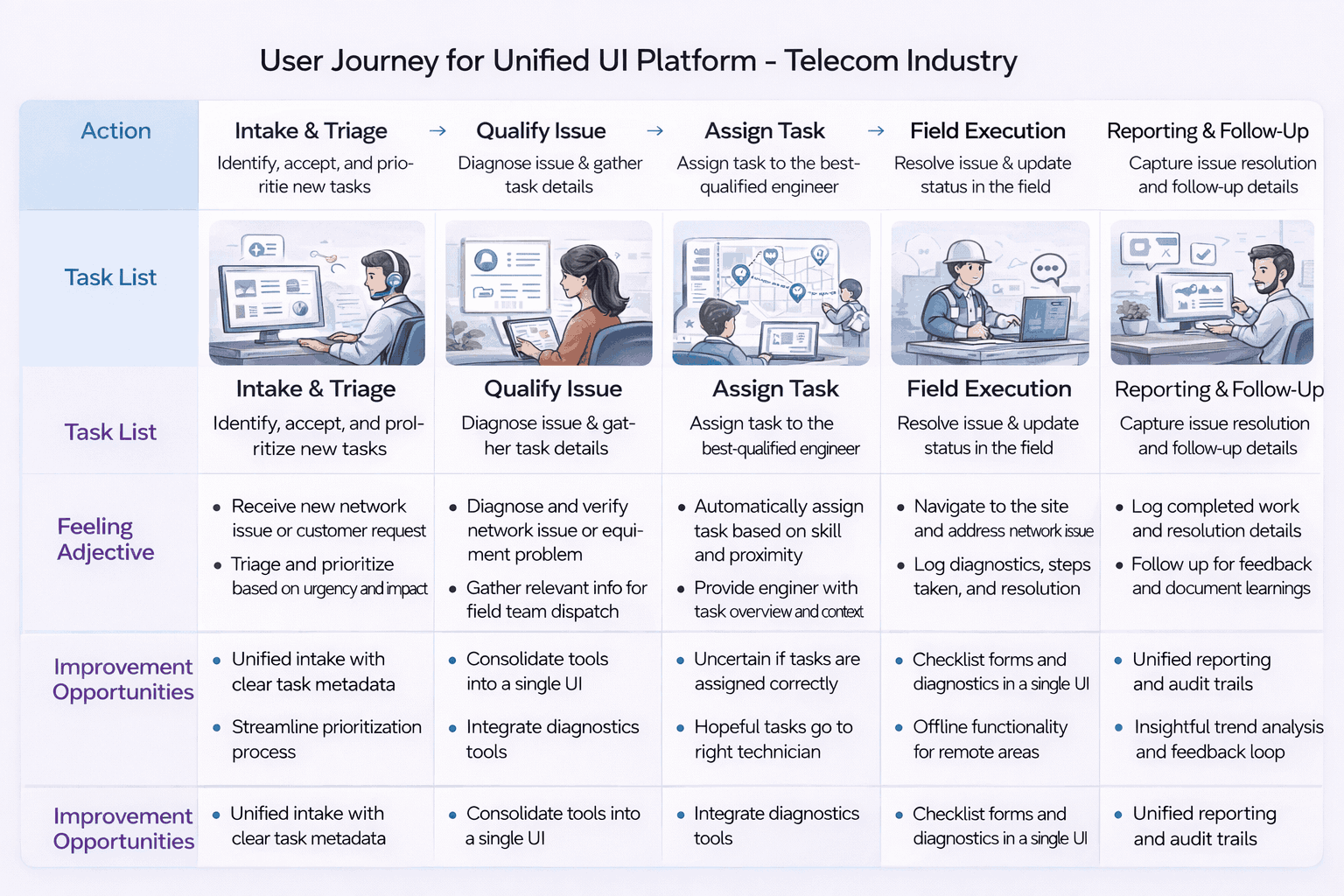
Journey mapping helped uncover:
- Systemic friction points across multi-step workflows
- Emotional drop-offs during complex or repetitive tasks
- High-impact opportunities to reduce effort and cognitive load
These journeys directly informed dashboard logic, widget composition, and interaction patterns—ensuring the experience reflected real operational needs.
White Boarding & Brainstorming
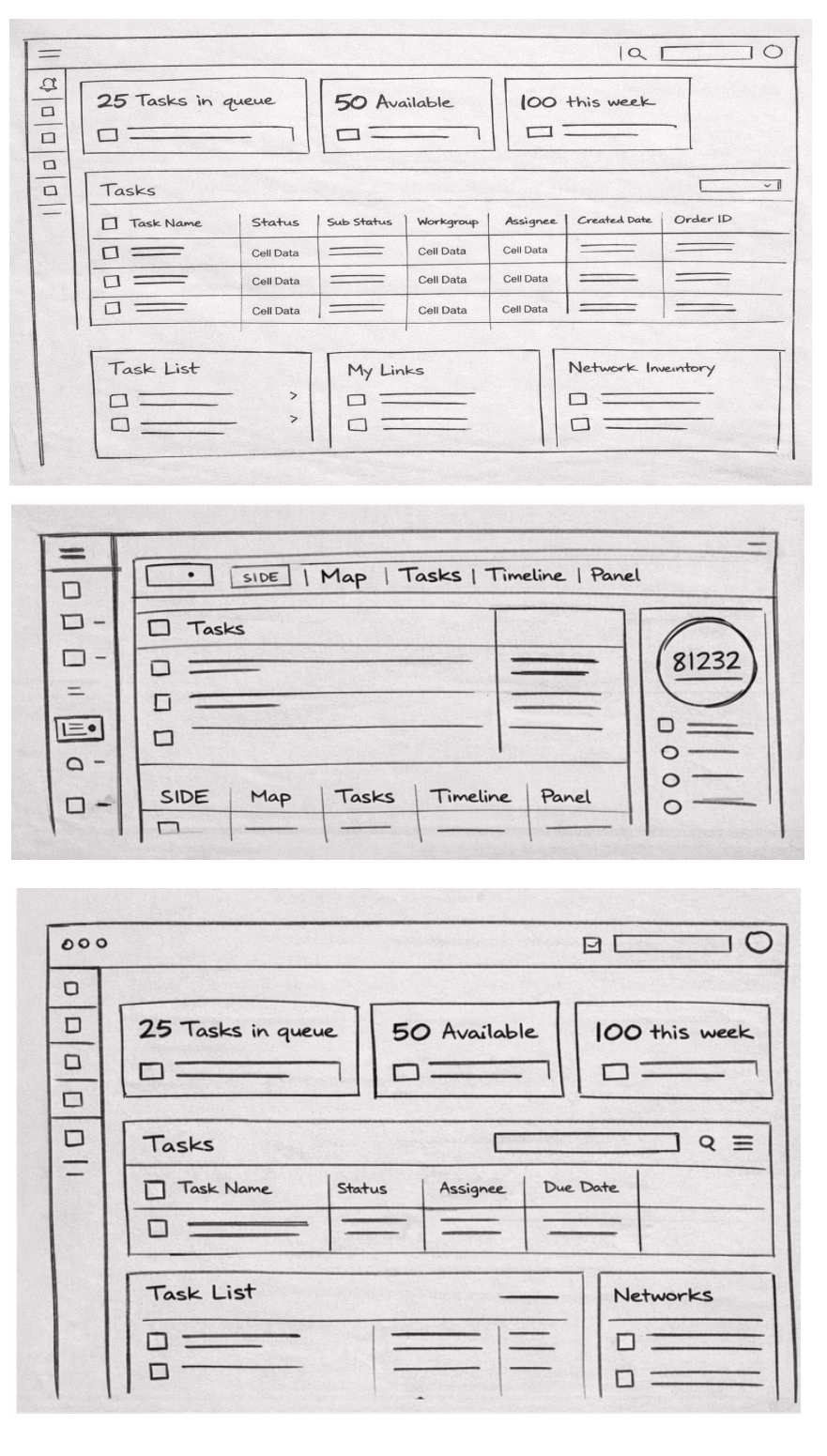
Whiteboarding and brainstorming sessions were used as a critical problem-solving tool to move from abstract insights to concrete, testable solutions. Storyboards translated research findings into actionable experience flows, enabling teams to visualize end-to-end interactions across multiple systems within a single, unified context.
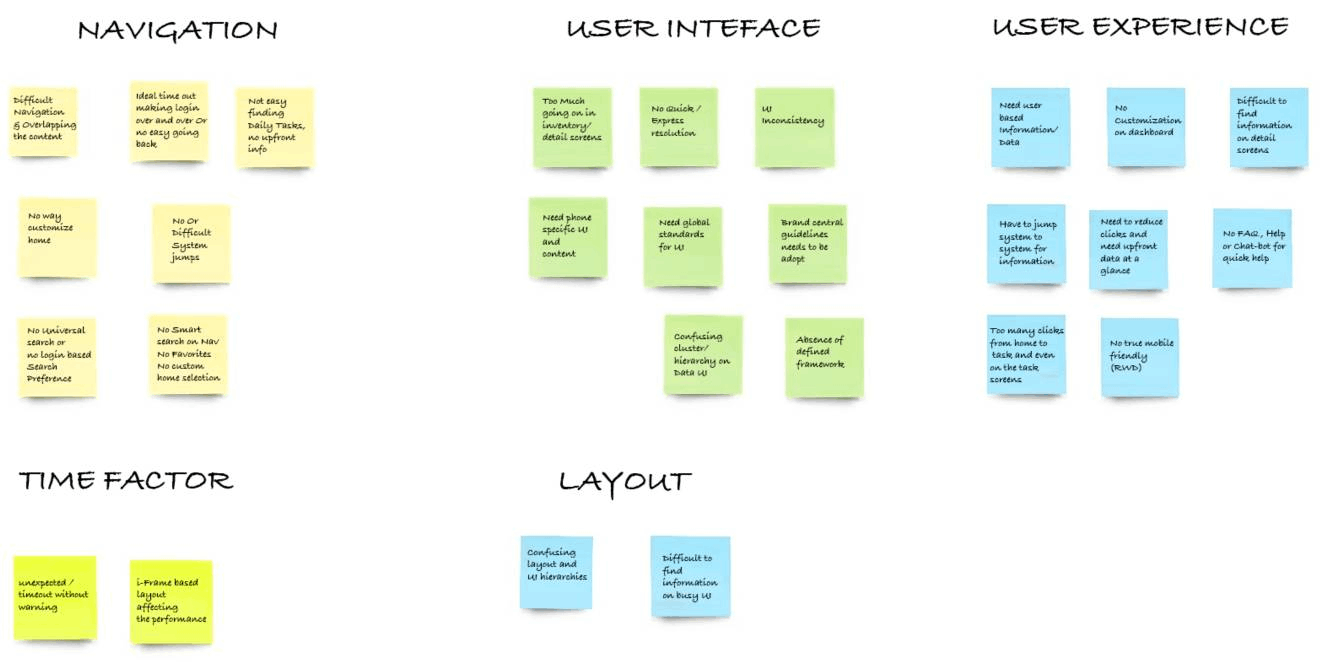
These sessions helped surface assumptions early, align product, design, and engineering teams around a shared mental model, and reduce ambiguity during design and development handoffs. By visualizing how users moved through tasks—rather than screens—the team was able to identify unnecessary steps, clarify decision points, and ensure the final designs accurately reflected real-world workflows before moving into high-fidelity execution.
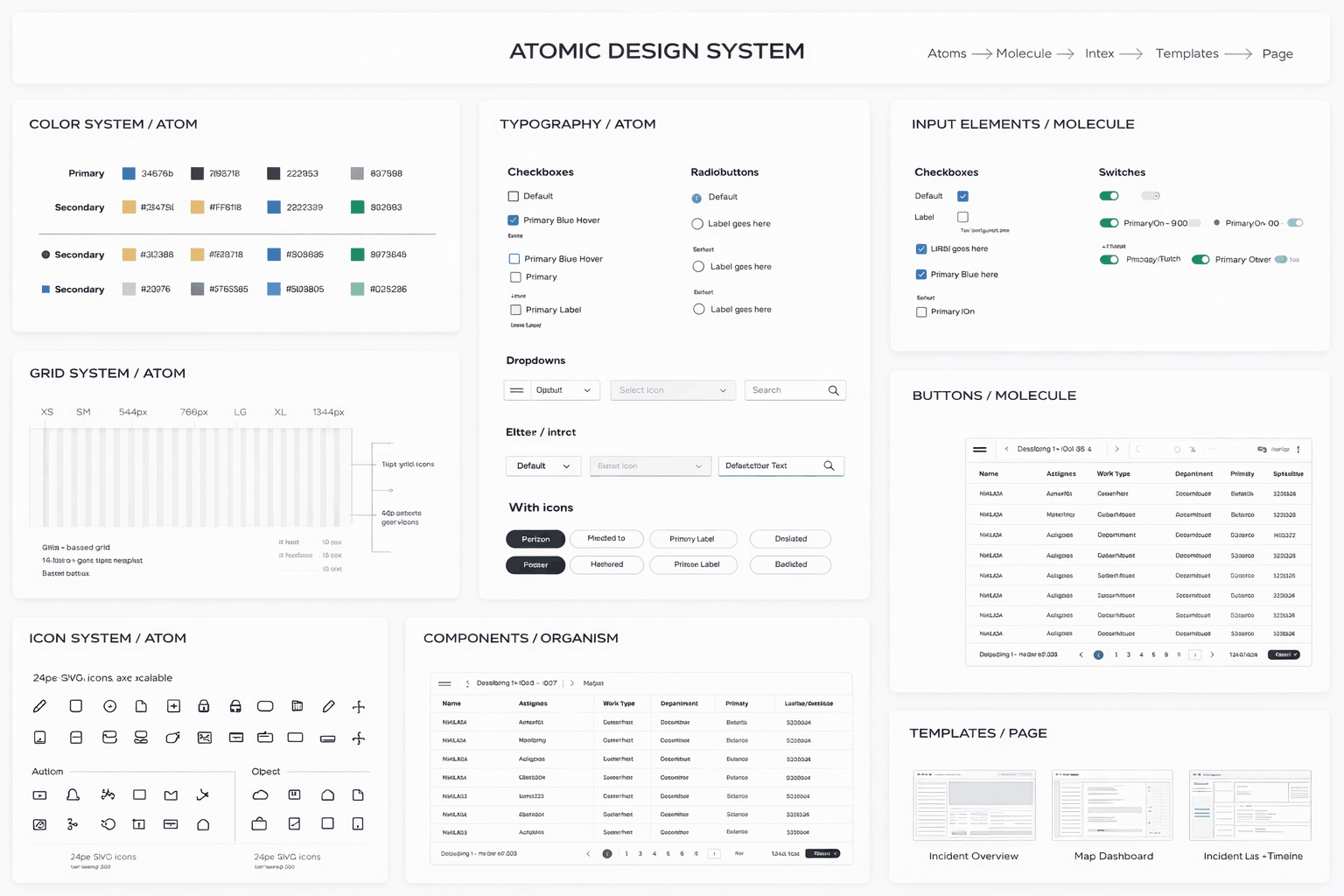
Problem Solving via Atomic Design
From a Senior Product Designer perspective, Atomic Design was not just a UI framework—it was the core problem-solving mechanism that enabled UUI to scale as a platform without reintroducing fragmentation.
Given the size and age of the legacy ecosystem, the primary challenge was ensuring that new experiences could be built quickly without breaking consistency. Atomic Design provided a clear structural model to decompose complex enterprise workflows into reusable, governed building blocks that could evolve independently while remaining coherent as a system.
The UUI design system was built hands-on using Atomic Design principles and included:
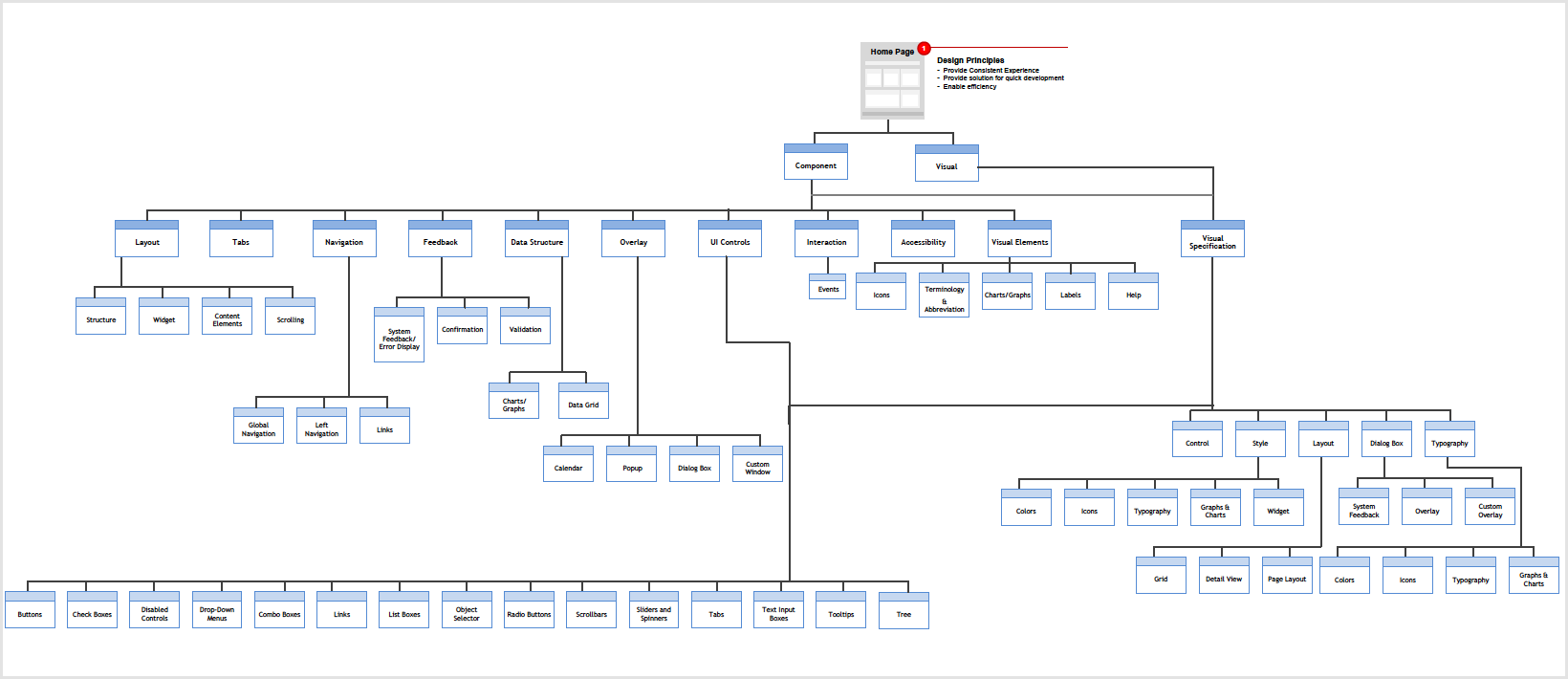
UX Governance — UUI Platform
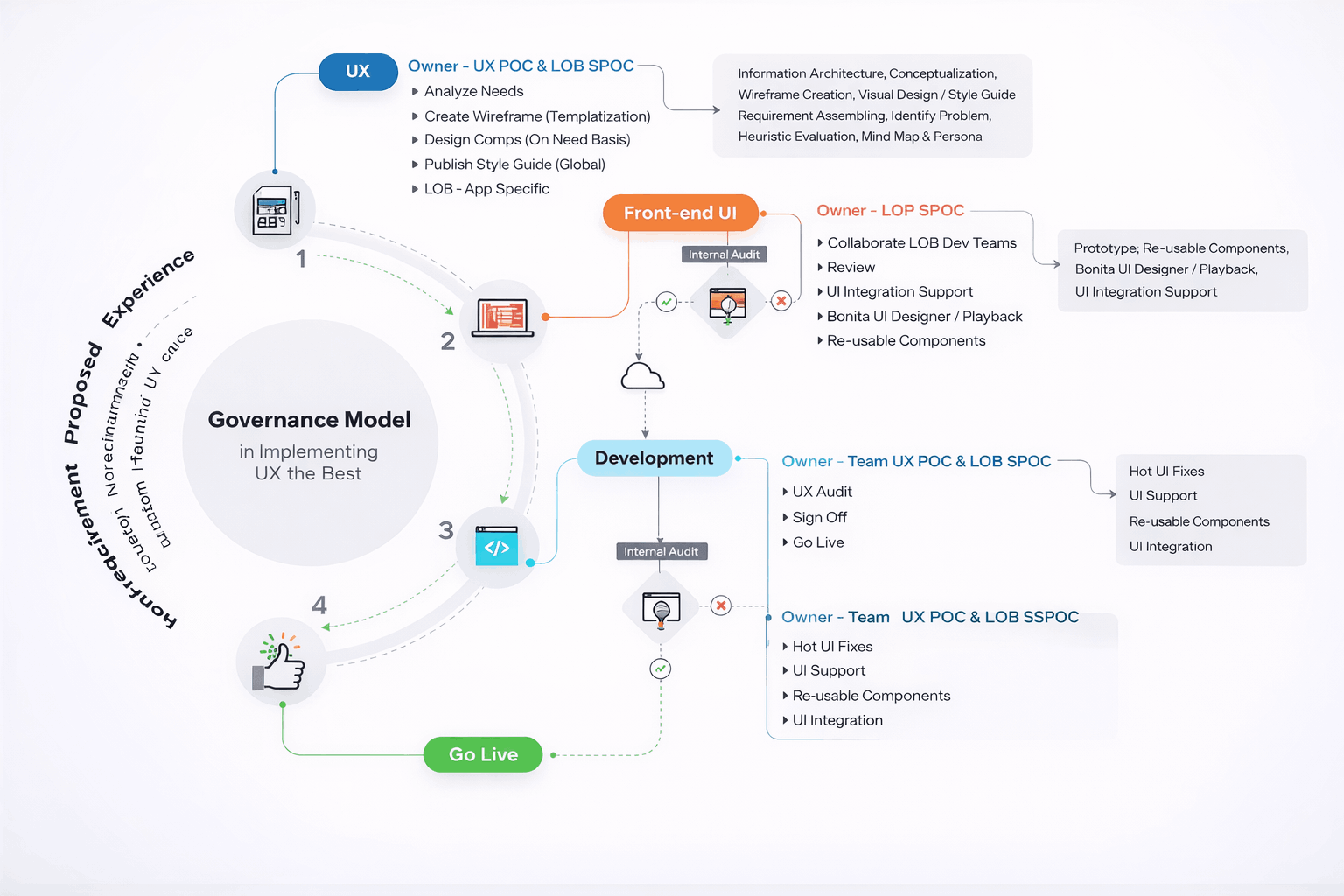
From the UUI platform perspective, UX governance was intentionally designed as a system capability, not a manual process. Given the scale of applications, teams, and vendors involved, relying on documentation or periodic reviews alone would not have sustained quality or consistency.
Instead, governance was embedded directly into the UUI platform and design system, ensuring that standards were applied by default as teams built and extended the experience.
Key governance mechanisms included:
-
Design standards baked into components
- Core components, patterns, and templates encoded layout rules, accessibility requirements, and interaction behavior—making the “right” design choice the easiest one. Consistent review and sign-off checkpoints
- Design reviews focused on adherence to system principles, task clarity, and scalability, rather than subjective visual preferences. Shared UX toolkits for designers and developers
- Unified design libraries, component documentation, and implementation guidelines ensured alignment across disciplines and reduced interpretation gaps.
By treating governance as part of the product system, UUI maintained experience quality, compliance, and consistency at scale, while still allowing teams to innovate and ship efficiently without friction.
Accessibility & Performance — UUI Platform
For the UUI platform, accessibility and performance were foundational design constraints, treated with the same priority as functionality and scalability. Given the diversity of users, roles, and usage contexts, the platform had to remain reliable, readable, and efficient across long work sessions and varied environments.
Accessibility was embedded at the system level rather than retrofitted:
-
WCAG-compliant color contrast and typography
- ensured readability across lighting conditions, displays, and age groups Keyboard navigation and screen-reader support
- were designed into core components, enabling full task completion without reliance on a mouse
- Clear focus states, spacing, and hierarchy reduced cognitive and visual strain during prolonged use
Performance considerations directly influenced interaction and system design:
-
The modular UI architecture
- ensured faster load times by rendering only relevant widgets and data per user profile Reusable components
- and optimized data calls reduced unnecessary re-renders and latency An optional dark mode
- supported extended usage scenarios, minimizing eye fatigue in low-light environments
By designing accessibility and performance as platform-level capabilities, UUI delivered an experience that was not only inclusive and compliant, but also fast, dependable, and comfortable for daily, high-volume enterprise use.
Impact
- 35% reduction in task completion time
- 40% reduction in training effort
- Unified platform adoption across business units
- Improved productivity, confidence, and trust in systems
Reflection & Learnings
- Enterprise UX succeeds when designers stay hands-on with systems, not just screens
- Unified platforms save time by reducing navigation, not adding abstraction
- AI-driven personalization is most effective when grounded in real workflows
- Design systems accelerate velocity only when aligned to how people work
- True transformation changes how work happens, not just how interfaces loo
Refining & Final UI
Final designs were reviewed and approved against defined UX guardrails, ensuring consistency across vendor execution, regulatory compliance, and brand expression. The outcome was a hiring platform governed as a long-term product system, not a series of isolated screens.